Power BI

Power BI
Catalog your Power BI workspaces, semantic models, reports, and dashboards - and trace every table and column back to the warehouse objects that power them.
Features
| Feature Name | Supported | Notes |
|---|---|---|
| Catalog Discovery | ✓ | Workspaces, Apps, Datasets, Tables, Columns, Measures, Reports, Pages, Dashboards, Tiles |
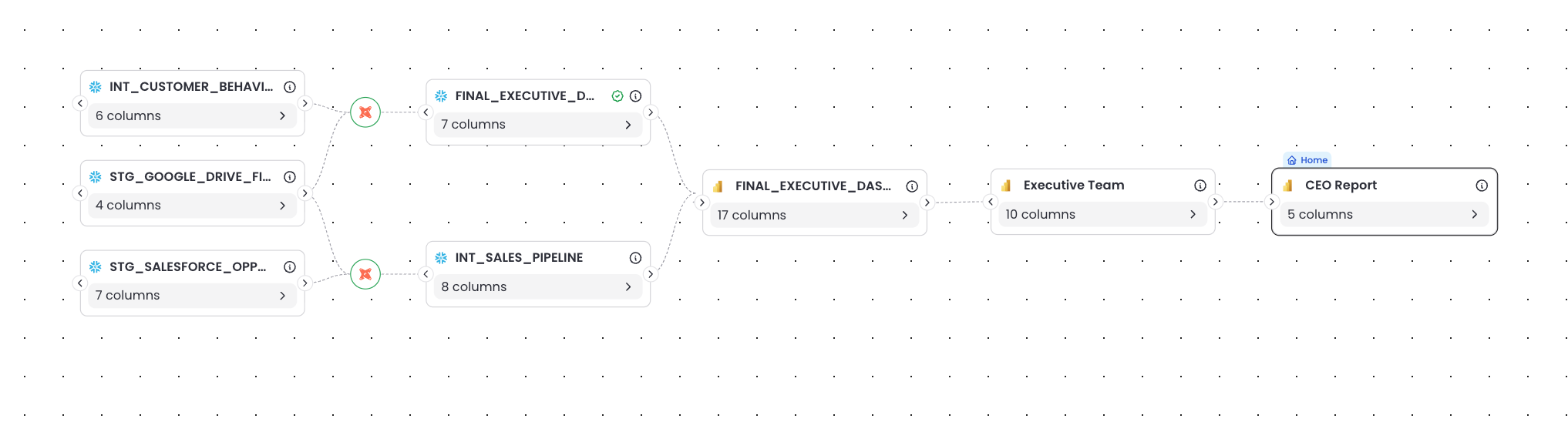
| Table-level Lineage | ✓ | Traces dataset tables to upstream warehouse tables by parsing M-Query (Power Query) expressions |
| Column-level Lineage | ✓ | Links dataset columns to warehouse columns, including through transformations that preserve column names |
| Multi-connection Support | ✓ | Distinguishes separate warehouse connections within the same Power BI tenant |
| Descriptions | ✓ | Asset descriptions from Power BI are surfaced in the Catalog |
| Endorsement Tags | ✗ | Not yet surfaced |
| Usage Statistics | ✓ | View counts and last-viewed timestamps on reports and dashboards |
What gets cataloged
Matia syncs the following Power BI objects into your catalog:
| Power BI Object | Cataloged as | Notes |
|---|---|---|
| Workspace | Asset | The root container for everything else |
| App | Asset | A distribution bundle. Reports and dashboards nest under the app that publishes them, and directly under the workspace otherwise |
| Dataset (semantic model) | Asset | The data-modeling layer; contains tables |
| Table | Asset | Belongs to a dataset; carries columns and measures |
| Column | Field | Typed from the dataset schema |
| Measure | Field | Sits alongside columns as a table field, and carries its DAX expression |
| Report | Asset | Bound to exactly one dataset; contains pages |
| Page | Field | A leaf under its report |
| Dashboard | Asset | A pinboard of tiles |
| Tile | Asset | Each tile gets its own asset page, where its lineage lives |
Lineage
Matia derives the lineage by parsing the M-Query expression behind each table in a dataset, combined with metadata from the Power BI Admin API.
Column-level lineage
Column-level lineage narrows this further, linking fields directly:
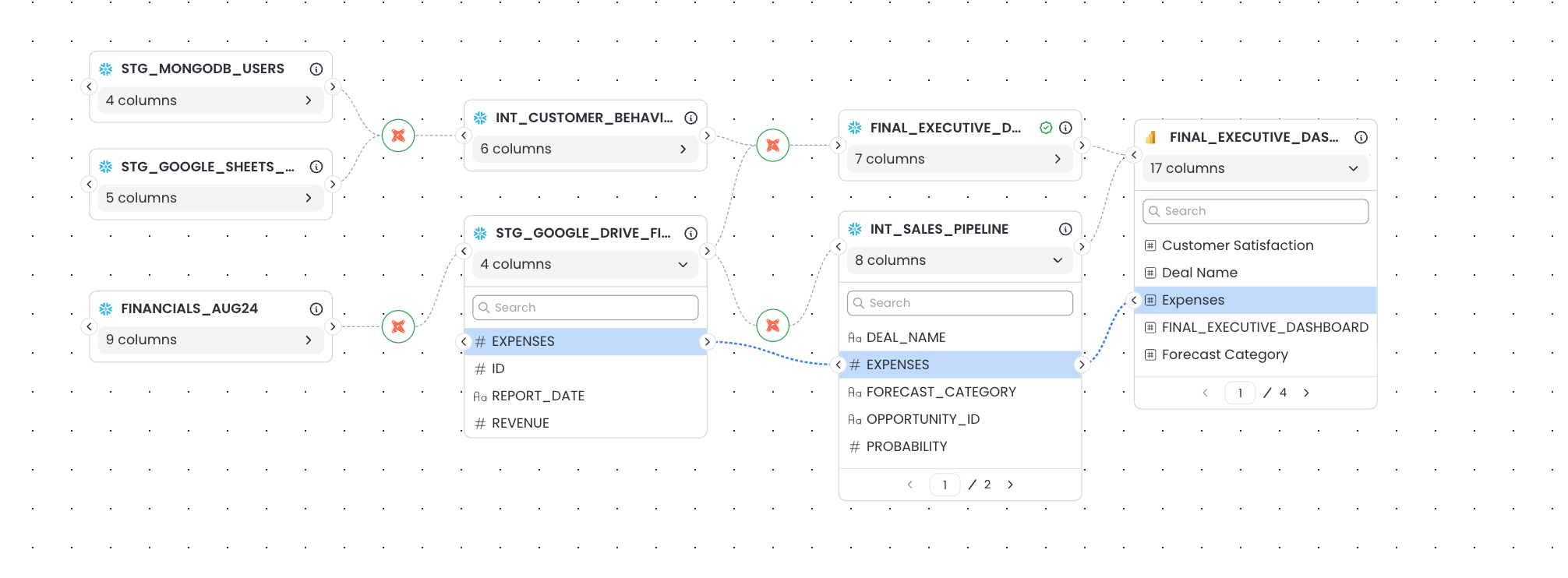
This resolves when a table reads its source directly - either a navigation into a warehouse table, or a native SQL query via Value.NativeQuery, whose SQL Matia parses to map each column to the warehouse columns it selects.
Column-level lineage also survives name-preserving transformations. Dropping, selecting, reordering, filtering, or sorting leaves the remaining columns corresponding to the warehouse columns they came from, so the links still hold:
Table.RemoveColumns · Table.SelectColumns · Table.ReorderColumns · Table.SelectRows · Table.Distinct · Table.Sort · Table.Buffer
Name-changing transformations break that correspondence - a renamed, unpivoted, or combined column can no longer be traced to a single warehouse column by name. There, Matia keeps the table-level link and drops the column-level one rather than guessing:
Table.RenameColumns · Table.Combine · Table.Unpivot · Table.Pivot · Table.AddColumn · Table.Group
Column-level lineage covers columns read from the warehouse. Fields computed in the semantic model - calculated columns and measures - are cataloged with their expressions, but have no upstream warehouse column to point at.
Usage Statistics
Every cataloged report and dashboard shows how it is actually being used - Matia presents which users viewed the report/dashboard, when they viewed them and how many times.
Usage is sourced from the Power BI activity log via the Admin API, which is why read-only Admin API access is a prerequisite. Usage covers reports and dashboards, datasets and tables have no view activity of their own.
Usage history starts accumulating when you connect. Matia will show the usage statistics from the day you connect the asset and forward.
Activity in workspaces you have not connected to Matia is not ingested.
Limitations
- Name-changing transformations lose column-level lineage. A table reshaped by
Table.RenameColumns,Table.Combine,Table.Unpivot,Table.Pivot,Table.AddColumn, orTable.Groupstill links to every warehouse table it reads at table level, but produces no column-level edges. Name-preserving transformations keep theirs. - Fields computed in the semantic model - calculated columns and measures - are cataloged with their expressions, but have no column-level lineage, since there is no upstream warehouse column to link to.
- Missing column metadata. Some tables return no column metadata due to permissions or connector-specific limits. Table-level lineage still appears; column-level does not.
- Cross-workspace datasets. If a report is bound to a dataset published in a different workspace, that workspace must also have the Matia app added as Contributor. Otherwise lineage for that report will be incomplete.
- Paginated reports.
PaginatedReportis a report variant with no pages - the Power BI API does not expose them for this report type, so none are cataloged. - Image and text tiles. A tile links back to a report only when it was pinned from a report page. Image and text tiles have no such edge.
- Endorsement tags are not yet surfaced in the Catalog.
Next Steps
- Setup Guide — Connect Power BI
- Release Notes — See recent changes