Tableau

Tableau
Catalog your Tableau workbooks, dashboards, and data sources — and trace every field back to the warehouse tables that power them.

Features
| Feature Name | Supported | Notes |
|---|---|---|
| Authentication | ✓ | Personal Access Token (PAT) |
| Catalog Discovery | ✓ | Projects, Workbooks, Dashboards, Worksheets, Embedded and Published Data Sources |
| Table-level Lineage | ✓ | Traces Tableau assets to upstream warehouse tables |
| Column-level Lineage | ✓ | Traces dashboard fields to warehouse columns; fields using custom SQL are automatically tagged |
| Usage Statistics | ✓ | Per-user view counts via Tableau Admin Insights (requires Admin Insights to be enabled on your Tableau site) |
What gets cataloged
Matia syncs the following Tableau objects into your catalog:
| Tableau Object | Cataloged as | Notes |
|---|---|---|
| Project | Container | Nested project hierarchies are preserved |
| Workbook | Asset | |
| Dashboard | Asset | Fields traced to upstream warehouse columns |
| Worksheet | Asset | Fields traced to upstream warehouse columns |
| Embedded Data Source | Asset | Custom SQL detected and tagged automatically |
| Published Data Source | Asset | Fields traced to upstream warehouse columns |
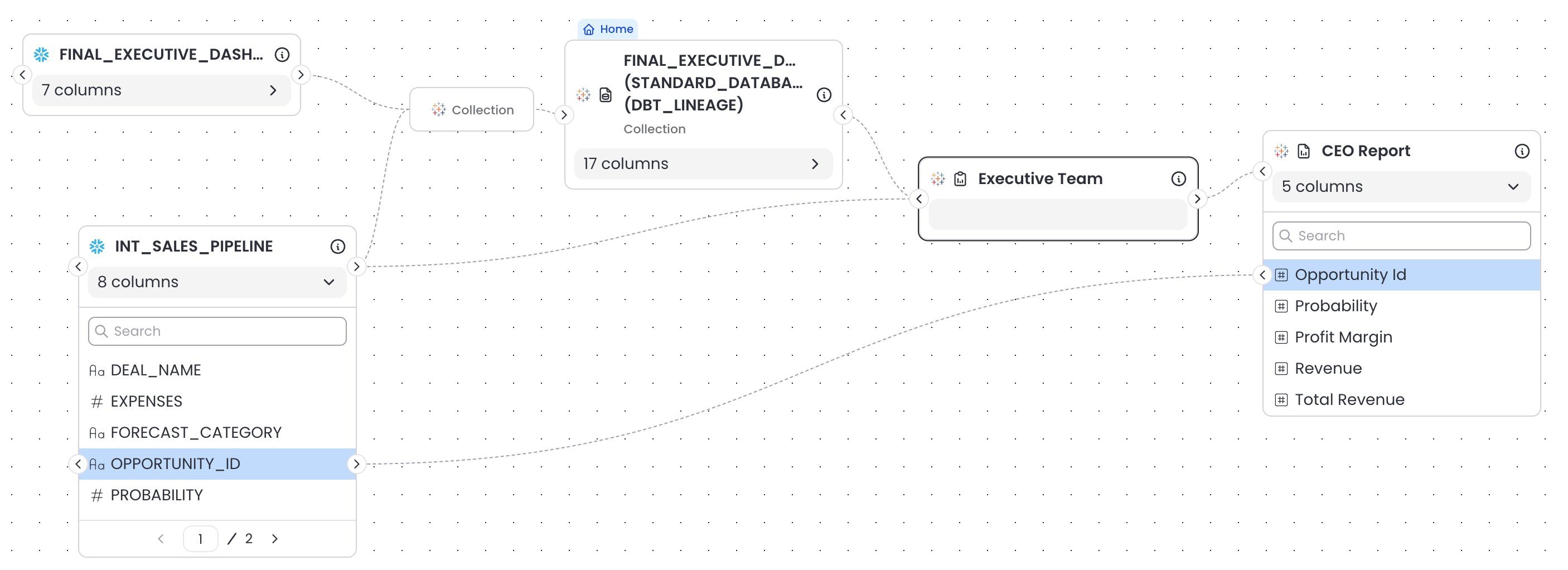
The resulting lineage chain in Matia runs:
Warehouse Table → (Published or Embedded) Data Source → Worksheet / Dashboard
Column-level lineage narrows this further, linking individual dashboard fields to the warehouse columns they reference.
Custom SQL tagging
Fields that reference custom SQL queries are automatically tagged "Contains Custom SQL" in the catalog. This makes it easy to identify which reports depend on ad-hoc queries rather than standard table references.
Usage statistics
When Tableau's Admin Insights feature is enabled on your site, Matia pulls per-user view counts for each view. This surfaces which dashboards and worksheets are most-used and by whom, directly in the catalog.
Admin Insights is available on Tableau Cloud and on Tableau Server with the appropriate license. If Admin Insights is not enabled, the connector will still catalog all metadata and lineage — usage data will simply be absent.
Next Steps
- Setup Guide — Connect Tableau
- Release Notes — See recent changes