Databricks

Databricks
Store and query your data in these supported warehouses and data lakes.
| Feature Name | Supported | Notes |
|---|---|---|
| ETL (Ingestion) | ✓ | Load data from 100+ sources into Databricks |
| Reverse ETL | ✓ | Activate warehouse data to downstream tools |
| Observability | ✓ | Monitor pipelines, schema changes, and dbt runs |
| Catalog Discovery | ✓ | Assets, descriptions, and tags from Unity Catalog |
| Native Databricks Lineage | ✓ | Queries Unity Catalog system tables to capture notebook, job, and table relationships |
| dbt Lineage | ✓ | Parses dbt artifacts to extract lineage between Databricks data assets |
| Supported Cloud Platforms | ✓ | AWS, Azure, Google Cloud |
Overview
Databricks is a unified Lakehouse platform that combines the flexibility of a data lake with the reliability and performance of a data warehouse. It supports analytics, data engineering, data science, and machine learning workloads - all built on open standards.
Matia connects to Databricks across all four platform pillars: ETL, Reverse ETL, Observability, and Catalog. Whether you're ingesting data into your Lakehouse, activating it downstream, monitoring pipeline health, or tracing lineage through Unity Catalog.
ETL & Reverse ETL
ETL (Ingestion)
Use Matia to load data from any of 100+ supported sources directly into Databricks. Matia handles schema creation, type mapping, incremental syncs, and error recovery - so your Lakehouse stays current without manual pipeline maintenance.
Matia supports Databricks on AWS, Azure, and Google Cloud. Authentication is via personal access token.
Reverse ETL
Activate the data already in Databricks by syncing it back to your CRM, marketing tools, customer success platforms, or any downstream destination. Matia's unified approach means anomaly detection happens at the point of sync - if corrupt or unexpected data is detected, Matia can stop the push before it reaches downstream tools.
Observability
Matia monitors your Databricks pipelines and dbt runs in real time — schema changes, data quality anomalies, and failed runs — with enough context to debug fast.
For your Lakehouse tables, Matia supports auto-generated monitors for freshness and row count, plus custom monitors on tables and columns (standard data quality checks or Custom SQL). Thresholds can be set manually with fixed rules and ranges, or automatically using ML-driven anomaly detection that learns from historical behavior.
Catalog & Lineage
Unity Catalog Integration
Databricks Unity Catalog is Databricks' unified governance layer for managing, securing, and auditing all data assets. It provides fine-grained access control, data lineage, and a searchable catalog - all within the Lakehouse.
Matia connects to Unity Catalog and surfaces the following in the Matia Catalog:
- Tags - Unity Catalog asset tags appear alongside your assets in the Matia Catalog, so governance metadata is visible without leaving your data workspace.
- Descriptions - Asset descriptions defined in Unity Catalog are pulled into Matia, keeping documentation centralized and consistent.
Lineage
Matia provides two complementary lineage sources for Databricks, giving you a complete picture of how data moves through your Lakehouse:
Native Databricks Lineage - Matia queries Unity Catalog system tables to capture relationships between notebooks, jobs, and tables. This covers lineage that dbt does not track.
dbt Lineage - Matia parses your dbt artifacts (manifest and run results) to extract column-level and table-level lineage between Databricks data assets. This gives you the full transformation graph for any dbt-managed model, directly in the Matia Catalog.
Together, these two sources produce a unified lineage graph that spans your entire Databricks environment:
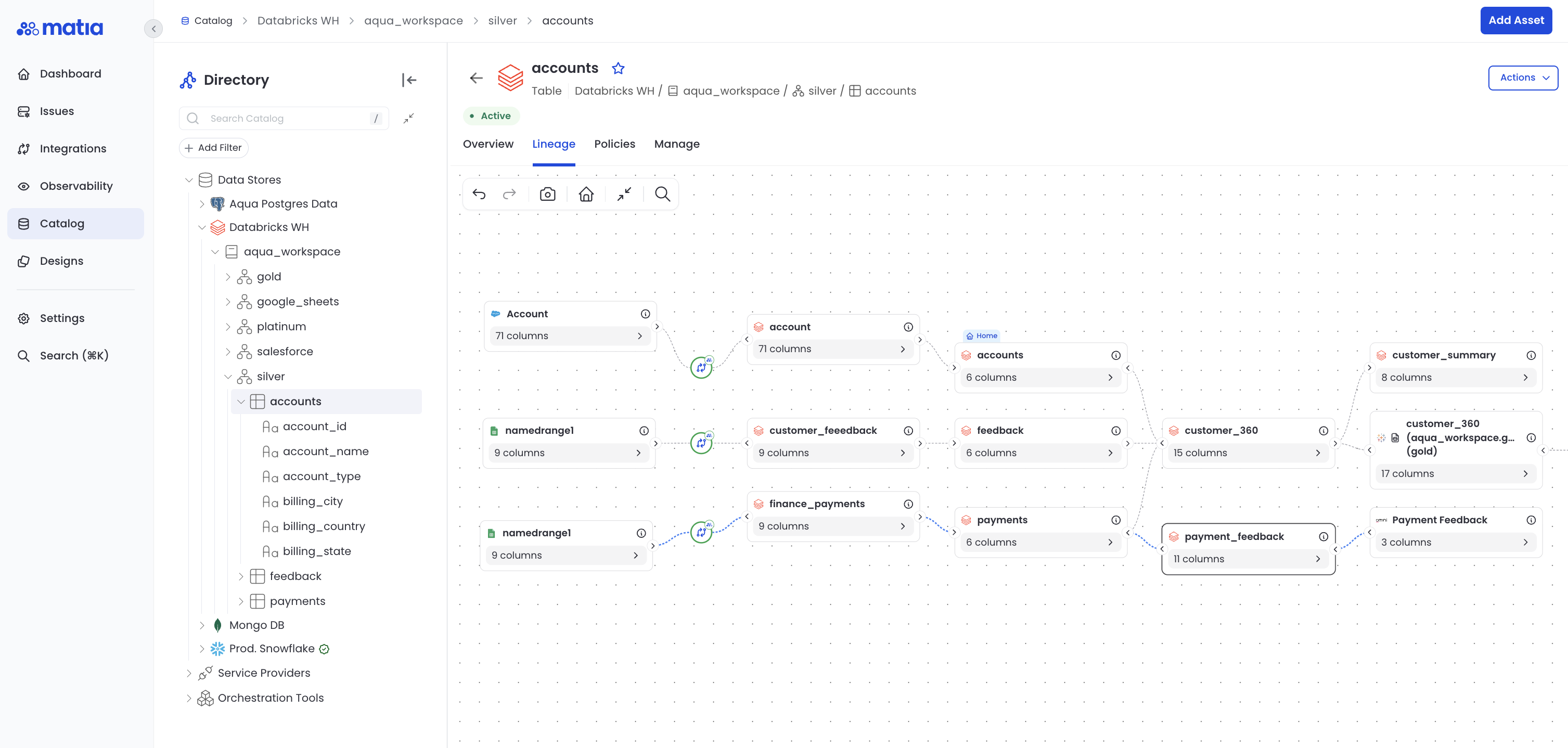
This is end-to-end lineage - not just the dbt slice of it.
Type Transformation Mapping
When Matia loads data into Databricks via ETL, source data types are mapped to the following Databricks types:
| Source Data Type | Databricks Type | Notes |
|---|---|---|
| BINARY | BINARY | |
| BIGDECIMAL | DECIMAL | |
| BIGNUMERIC | BIGINT | |
| BOOLEAN | BOOLEAN | |
| DATE | TIMESTAMP | |
| DECIMAL | DECIMAL | |
| DOUBLE | DOUBLE | |
| FLOAT | FLOAT | |
| INSTANT | TIMESTAMP | |
| INT | INT | |
| INTEGER | BIGINT | |
| JSON | STRING | Databricks does not have a native JSON type |
| LOCALDATE | DATE | |
| LOCALDATETIME | TIMESTAMP | |
| LONG | BIGINT | |
| NUMBER | BIGINT | |
| SHORT | SMALLINT | |
| SMALLINT | SMALLINT | |
| STRING | STRING | |
| TIMESTAMP | TIMESTAMP |
Databricks is case-insensitive for column names. Matia lowercases all column names when writing to Databricks.
Next Steps
- Setup Guide — Learn how to connect Databricks
- API Configuration — View API details
- Release Notes — See recent changes